Photo Size Reducer on Android and iPhone: Reduce File Size or Dimensions
Reduce photo size on Android or iPhone: pick file size in KB or MB, pixel dimensions, or both, depending on what the form asks for.
Published October 28, 2026
"Reduce photo size" can mean two different things: a smaller file (fewer KB or MB) or smaller pixel dimensions (a lower width and height). A photo size reducer on your phone should let you change either one, or both. ResizePing does this on Android and iPhone. Your files never leave your device.
Need a photo at this size? ResizePing resizes photos to exact dimensions or a file size on iPhone and Android. Get it on Google Play or the App Store.
Which one does the form mean?
Read the exact wording of the limit before you touch the photo.
| The form says | What to change |
|---|---|
| "Max 200 KB", "under 1 MB", "file size" | File size (Target size mode) |
| "Max 800x600 px", "width 600, height 800", "at least 300 px wide" | Pixel dimensions (Dimensions or Percent) |
| Both a pixel size and a KB limit | Both: dimensions first, then file size |
| A print size such as 35x45 mm | Dimensions, using a print size and DPI |
The two limits are separate. A photo can be small in pixels and still be heavy in KB, and a photo with many pixels can be squeezed under a KB limit. If a portal rejects your upload, check which of the two it is complaining about.
Option 1: reduce the file size (KB or MB)
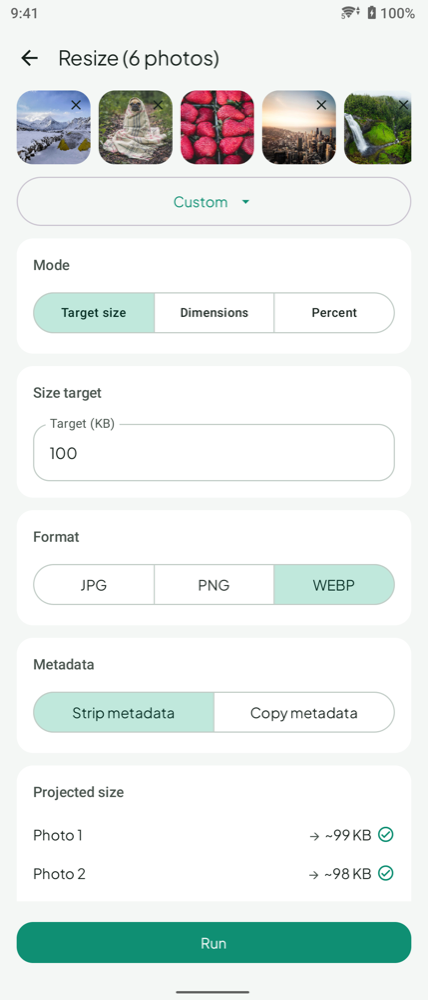
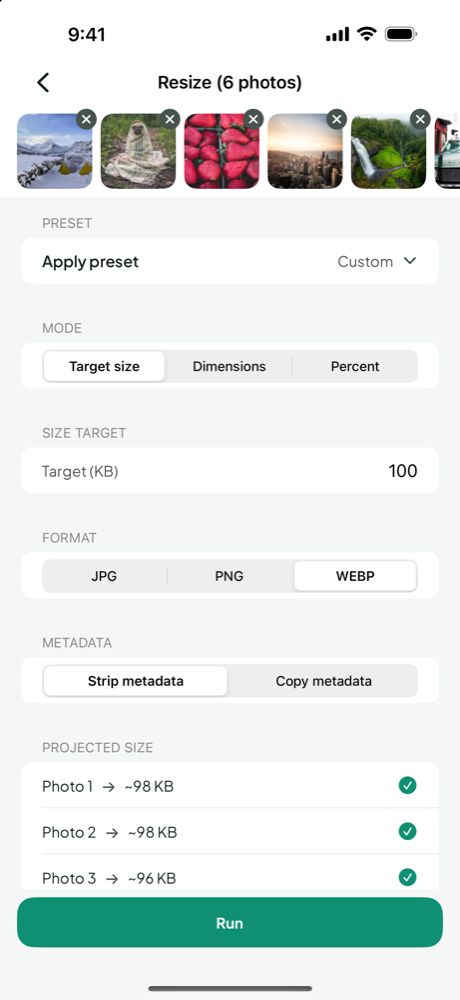
Use this when the limit is in KB or MB.
- Open ResizePing and choose the photo, or several photos.
- Change Mode to Target size.
- Type your limit in Target (KB).
- Check the Projected size shown for each photo before you run anything.
- Tap Run and look at the saved file's size.
If the target can't be reached, ResizePing warns you before you run, so you are not left guessing. When that happens, lower the pixel dimensions first (Option 2) and then set the target again. For worked examples at common limits, see Resize Image in KB on Android or iPhone, Resize an Image to 50 KB and 100KB Photo Size.
Option 2: reduce the pixel dimensions
Use this when the limit is a width and height, or when you simply want a smaller picture.
- Dimensions: enter the exact width and height in pixels.
- Percent: scale the photo down by a percentage when you don't need an exact size.
- Print size: for physical prints, set the size in mm, cm or inches with a DPI value.
Fewer pixels usually also means a smaller file, which is why this is the first thing to try when a KB target is out of reach. Our guide How to Resize a Photo on Android and iPhone walks through the steps.
Option 3: both
Some forms ask for a pixel size and a KB limit at once. Do it in two passes: first resize to the required dimensions, then run Target size on that result. Then check both the final dimensions and the file size.
Quality and format choices
- Quality presets: Best, Balanced and Smallest. Best keeps the most detail, Smallest makes the lightest file.
- Output format: JPG, PNG or WEBP. Pick whatever the upload form accepts.
- Location data: stripped by default, so a shared copy doesn't carry where the photo was taken.
- Batch: process one photo or several in a single run, each with its own projected size.
What you give up
A smaller photo can look different from the original, so inspect the result. Before you submit:
- Look at the result at full size before you submit it.
- Check the saved file's size, because the projected size is an estimate.
- Keep the original photo in case a form needs a different size later.
For more on the file-size side, read How to compress image size on Android and iPhone. To do many photos in one go, see Batch Resize Images on Android and iPhone.
FAQ
Does reducing photo size reduce quality?
It can. Look at the result before you submit it. Choose the Best or Balanced preset when quality matters, and the Smallest preset only when the limit is tight.
Is a photo size converter the same as a photo size reducer?
People use both terms for the same job: changing a photo's size so it fits a limit. In ResizePing you can change the file size, the pixel dimensions, or the output format (JPG, PNG or WEBP) in the same app.
What if the form gives both a KB limit and a pixel size?
Resize to the pixel dimensions first, then use Target size for the KB limit. Check the final file's size and dimensions before you upload.
Will my photos be uploaded anywhere?
No. Your files never leave your device.
Related guides
- How to compress image size on Android and iPhone step by step
- Resize Image in KB on Android or iPhone (10 KB to 2 MB)
- How to Resize a Photo on Android and iPhone
- Resize an Image to 50 KB on Android or iPhone
- 100KB Photo Size: Target 100 KB on Android or iPhone
- Batch Resize Images on Android and iPhone