Extract Phone Numbers from Text (and Open Them in WhatsApp)
Got a number buried in a message, a screenshot or a business card photo? Pull it out and open the WhatsApp chat in a few taps, without saving a contact.
Published October 27, 2026
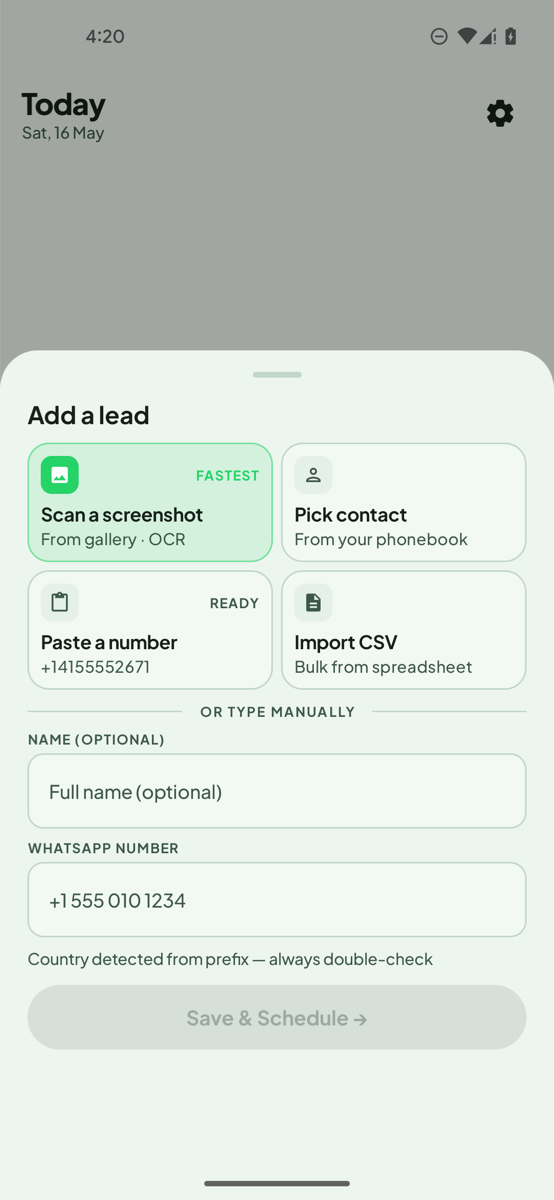
To extract a phone number from text on Android, select the number and tap Save lead in LeadPing in the context menu, or share the text or a screenshot to LeadPing. LeadPing opens a new-lead form with the number filled in. Tap Save, then open its WhatsApp chat from there, without adding a contact.
Pull numbers out of messages, fast. LeadPing saves WhatsApp numbers outside your contacts. Get it on Google Play.
Steps
These steps are for Android.
From text in any app
- Select the phone number in a message, web page or note.
- In the menu that appears, tap Save lead in LeadPing.
- LeadPing opens a new-lead form with the number filled in. Tap Save, then open the lead to start a WhatsApp chat.
From shared text
- Tap Share on the text and choose LeadPing.
- LeadPing reads the number and opens a new-lead form with it filled in. Tap Save.
From a screenshot
- Open LeadPing, open the Add a lead sheet and tap Scan a screenshot.
- Pick the screenshot from your gallery. LeadPing reads the numbers in it.
- Select the numbers you want and add them as leads. You can edit names later.
You can also share a screenshot to LeadPing from your gallery, or tap Paste a number to take one from your clipboard.
Several numbers at once
Scan a screenshot with a list of numbers, select the ones you want and add them in one go. For a spreadsheet, use Import CSV instead.
If it can't find a number
If a screenshot has no readable number, LeadPing tells you it found none, and you can type the number in yourself. Blurry or tiny text is the usual cause, so try a sharper screenshot.
Without an app
You can pull a number out by hand. Copy the digits, then open https://wa.me/<number> in your browser, with the country code and no spaces or plus sign. WhatsApp opens a chat with that number. It works one number at a time.
What to know
- Always check the country code before you message. LeadPing detects it from the prefix, and it can be wrong.
- LeadPing opens the chat for you. It never sends the message.
- Your saved numbers, notes and follow-ups stay on your device.
FAQ
- How do I extract phone numbers from text? On Android, select the number and tap Save lead in LeadPing, or share the text to LeadPing, then tap Save.
- Can I get a number from a screenshot? Yes, use Scan a screenshot or share the screenshot to LeadPing.
- Do I have to save the number as a contact? No. LeadPing keeps it as a lead, outside your contacts.
- Does it work on iPhone? The steps here are for Android.